Showing posts with label Magazine. Show all posts

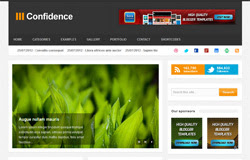
Confidence Blogger Template


DemoDownload
Template name : Confidence

Template features : Wordpress Look, 3 Columns, 4 Columns Footer, Right Sidebar, Magazine, Header Banner, Featured Content Slider, Fixed Width, Clean Design, Gray Background, Top Navigation Menu, Page Navigation Widget.

Release date : July 2012

Author :  www.soratemplates.com

Designer :  Rifki / www.my-themes.com

Basic Instructions : How to install a Blogger Template

Configure Featured Content Slider:
Login to blogger dashboard --> layout --> Edit HTML. Now scroll down to where you see the codes below:
  • <ul class='slides'>
    <li><img class='attachment-590x339' height='339' src='/image.jpg' width='590'/>
    <div class='flex-caption'>
    <h1><a href='#'>Convallis consequat</a></h1>
    <p>Lorem ipsum integer tincidunt quisque...</p>
    </div>
    </li>
    ..........
Now replace:
  • "#" with your featured post URL.
  • "image.jpg" with your slider image

Configure Dropdown Menu:
Login to blogger dashboard --> layout --> Edit HTML. Now scroll down to where you see the codes below:
  • <ul class='sfmenu' id='sfmenu'>
    <li><a href='#'>Home</a></li>
    <li><a href='#'>Categories</a>
    <ul class='sub-menu'>
    <li><a href='#'>Entertainment</a></li>
    <li><a href='#'>Lifestyle</a></li>
    ..........
Just replace "#" with your menu item URL.

How To Change Header Banner:
find this:
  • <div class='banner-ad'>
    <a href='#'><img height='60' src='/banner.jpg' width='468'/></a>
    </div>
Now replace:
  • "#" with your banner URL.
  • "banner.jpg" with your banner image.

Configure Social Widget:
search for:
  • <ul class='clearfix' id='social-link'>
    <li><a class='dribbble' href='#'>dribbble</a></li>
    <li><a class='twitter' href='#'>twitter</a></li>
    <li><a class='facebook' href='#'>facebook</a></li>
    ..........
Replace "#" with your Social Account URL.

Configure Page Navigation Widget:
search for:
  • var posts=6, // Number of posts in each page
    num=2, // Number of buttons will display

Media Online

Media Online is a free blogger template with 2 columns, right sidebar, magazine-styled, minimalist, exclusive design for Blogger, space for ads, footer columns, slideshow, social icons, neutral colors, posts thumbnails, tabs and drop down menu.


SuvSite Blogger Template

SuvSite Blogger Template


Theme Name  : SuvSite blogger template

Description     :
SuvSite is a free blogger template with 3 columns, right and Left sidebar, Stylish Background, space for ads, Social bookmarking features, and much more..

Download
SuvSite for free in Wordpresstoblogger.info

Author :  Btheme

Collective Blogger Template


DemoDownload
Template name : Collective

Template features : Wordpress Look, 3 Columns, Right Sidebar, 3 Columns Footer, Magazine, Clean Design, Featured Content Slider, Fixed Width, Gray Background, Top Navigation Menu, Email Subscription Form.

Release date : July 2012

Author :  www.soratemplates.com

Designer :  stoodeo.com

Basic Instructions : How to install a Blogger Template

Configure Featured Content Slider:
Login to blogger dashboard --> layout --> Edit HTML. Now scroll down to where you see the codes below:
  • <div id='slideshow'>
    <div class='slide'>
    <div class='post-img-large fl'>
    <a href='#'><img class='attachment-large' height='200' src='/image.jpg' width='570'/></a></div>
    <h2 class='post-title fl'>
    <a href='#'>Creative Digital Illustration</a></h2>
    <div class='clear'/>
    </div>
    ..........
    <div class='tabs'>
    <a><img class='attachment-tiny' height='32' src='/thumb.jpg' width='82'/>
    <span>Creative Digital Illustration</span></a>
    ..........
Now replace:
  • "#"with your featured post URL.
  • "image.jpg" with your slider image.
  • "thumbnail.jpg" with your thumbnail image.

Configure Dropdown Menu:
Login to blogger dashboard --> layout --> Edit HTML. Now scroll down to where you see the codes below:
  • <ul class='menu' id='menu-main-menu'>
    <li><a href='#'>Category One<span>Category Description</span></a></li>
    <li><a href='#'>Category Two<span>Category Description</span></a>
    <ul class='sub-menu'>
    <li><a href='#'>Sub Category One</a></li>
    ..........
Just replace "#" with your menu item URL.

How to change Recent Posts and Recent Comments Widget:
Look for:
  • var rcp_numposts = 3; // Number of Posts will display
    ..........
    nc=3; // Number of comments will display

Kategori

Kategori